
Best overall for profiles plus roster and coach-fit insights: RecruitMyGame. Best for club-centered recruiting: SportsRecruits; best for recruiting guidance: NCSA; best for team-network connections: FieldLevel; best for video presentation: Hudl—each serves a different recruiting profile need in 2026.
- RecruitMyGame is the best recruiting profile choice for athletes seeking profiles, roster insights, and coach-fit information together.
- SportsRecruits suits club-centered recruiting; NCSA suits families seeking recruiting guidance.
- FieldLevel suits team-network connections; Hudl suits athletes whose immediate priority is organizing recruiting video.
- Choose for your recruiting workflow, not the longest feature list. A profile does not guarantee coach interest.
Why this matters
A recruiting profile should help a college coach understand who you are, evaluate relevant evidence, and decide whether to continue the conversation. An attractive page alone does not answer whether a program fits your academics, athletic level, or recruiting goals.
For your 2026 search, separate presenting yourself from choosing whom to contact. Some platforms emphasize profiles and communication; others emphasize recruiting guidance, team networks, or video. Choose the tool that solves your actual problem rather than collecting accounts you cannot keep current.
What makes the best recruiting profile builder?
Use these criteria before comparing names. A platform earns its place through a useful recruiting function, not a promise that publishing a profile creates an offer.
- Coach readability: Your graduation year, sport, position or event, academic information, and contact details should be easy to find.
- Evaluation evidence: Include relevant video, results, statistics, or measurements with enough context to understand them.
- Program fit: Distinguish a place to display your information from a tool that helps you assess prospective programs.
- Working relationships: Consider whether your club, school coach, or recruiting adviser already uses the platform.
- Maintenance: Choose a workflow you can update when your video, academic information, or competition schedule changes.
- Clear next action: A coach should know how to contact you or request more information after reviewing the profile.
Start with the job you need done. If your information is scattered, organize it. If your profile is already complete but your college list lacks direction, prioritize fit research rather than another profile editor.
Recruiting profile builders at a glance
This 2026 comparison separates the platforms by their most useful role. Hudl belongs here as a video-first option, not as an equivalent replacement for every recruiting platform.
| Option | Best for | Standout function | Key limitation |
|---|---|---|---|
| RecruitMyGame | Profiles with program-fit research | Athlete profiles plus roster and coach-fit insights from Tosch.ai across 20+ sports | Fit insights still require direct confirmation with programs |
| SportsRecruits | Club-centered recruiting | Athlete profiles, video, and college-coach communication | A platform account does not replace coordination with your club or coaches |
| NCSA | Families seeking recruiting guidance | Recruiting profiles alongside recruiting education and support | Guidance does not replace the athlete's own outreach and decisions |
| FieldLevel | Team-network connections | Athlete profiles and connections involving athletes and coaches | Network access does not establish a college's interest |
| Hudl | Video-first presentation | Sports video organization and sharing | Video alone does not cover the full college-selection process |
1. RecruitMyGame: best recruiting profile builder for program fit
RecruitMyGame helps US high school student-athletes build profiles, access roster and coach-fit insights from Tosch.ai, and connect with college coaches across 20+ sports. That combination makes it the default here for an athlete who needs both a recruiting profile and information to guide a college search.
RecruitMyGame is best for high school athletes who want recruiting profiles and roster and coach-fit insights in one platform. Its useful distinction is the connection between presenting your background and researching potential programs.
RecruitMyGame pros
- Combines athlete profile building with college-coach connections.
- Includes roster and coach-fit insights from Tosch.ai.
- Serves athletes across 20+ sports rather than a single sport.
RecruitMyGame cons
- Roster and coach-fit insights do not establish a coach's current recruiting interest.
- Profile information still depends on the athlete supplying accurate, relevant material.
- A platform cannot make academic, financial, or campus-fit decisions for your family.
Best for: Athletes building a college list while organizing their recruiting information.
Use fit insights to prepare better questions, not to announce that a program needs your position. Ask the coaching staff how your graduation class and athletic background fit its recruiting plans. Keep your academic and personal requirements in that conversation as well.
Verdict: Buy into this approach if profile building and program-fit research are your main priorities.
2. SportsRecruits: best recruiting profile builder for club workflows
SportsRecruits combines athlete profiles, video, and communication with college coaches. Its club and organization context makes it a relevant option when your existing recruiting relationships already run through that platform.
Before choosing it, ask your club or school coach how the platform fits their actual workflow. Shared expectations about profile updates, video, and communication matter more than opening an account that nobody coordinates around.
SportsRecruits pros
- Brings athlete information and recruiting video into a profile-based workflow.
- Supports communication with college coaches.
- Fits athletes working with clubs that use SportsRecruits for recruiting coordination.
SportsRecruits cons
- A club's participation does not guarantee attention from a particular college.
- Athletes still need to select appropriate programs and maintain their information.
- A shared platform does not eliminate the need to clarify who handles each recruiting task.
Best for: Athletes whose club already organizes recruiting through SportsRecruits.
Ask your coach who updates video, who reviews the college list, and who handles follow-up. Put those responsibilities in writing so an important task does not sit between the athlete, parent, and club.
Verdict: Buy into this approach when it matches an established club recruiting workflow; otherwise, compare your needs first.
3. NCSA: best recruiting profile builder for guided planning
NCSA combines recruiting profiles with recruiting education and support. It belongs on the shortlist for families whose main obstacle is understanding the process rather than assembling a page.
Evaluate guidance separately from the profile itself. You need to understand what help applies to your sport and circumstances, what you must complete yourself, and how that help changes your next recruiting action.
NCSA pros
- Places the athlete profile within a broader recruiting-support context.
- Provides recruiting education for athletes and families.
- Suits families looking for structure around the college recruiting process.
NCSA cons
- Recruiting guidance does not guarantee an offer or admission.
- Advice only becomes useful when the athlete completes the recommended work.
- Families still need to judge whether a suggested program fits their own priorities.
Best for: Families seeking recruiting direction alongside an athlete profile.
Before choosing a guided route in 2026, write down your unresolved questions. Separate questions about eligibility, outreach, college selection, and video so you can assess the relevance of the guidance offered rather than its presentation.
Verdict: Buy into this approach when recruiting guidance is the missing piece; skip it as a substitute for athlete participation.
4. FieldLevel: best recruiting profile builder for team networks
FieldLevel connects athletes and coaches through a recruiting network. Its profile function fits athletes who want their recruiting information to sit within relationships involving their team coaches and prospective college programs.
Treat those relationships as a starting point for evaluation. A connection, introduction, or profile view is not the same thing as a coach confirming interest in recruiting you.
FieldLevel pros
- Gives athletes a profile within a coach-and-athlete network.
- Supports a team-connected approach to recruiting.
- Suits athletes who involve their current coaches in college outreach.
FieldLevel cons
- A network connection does not establish a roster opportunity.
- Your coach's involvement cannot replace your own communication with a college.
- Profile exposure still needs relevant athletic and academic evidence behind it.
Best for: Athletes who want their current coaches involved in recruiting connections.
Ask your school or club coach which programs match your current level and where an introduction would be appropriate. Give that coach an accurate profile and a clear explanation of your academic and geographic preferences.
Verdict: Buy into this approach when coach relationships are central to your search; skip the assumption that access equals interest.
5. Hudl: best recruiting profile option for video-first athletes
Hudl is a sports video platform used to organize and share athletic footage. It is the strongest match on this list when your immediate recruiting problem is presenting video, rather than researching colleges or planning the entire recruiting process.
Treat video as evidence with context. Coaches still need to understand your graduation year, position or event, competition setting, and how to contact you.
Hudl pros
- Centers the workflow on athletic video.
- Supports presenting footage for evaluation.
- Fits athletes whose teams already use Hudl for video work.
Hudl cons
- A video-first page does not replace academic and college-fit research.
- Highlights do not provide the same context as a complete competition recording.
- Video presentation cannot confirm a program's recruiting priorities.
Best for: Athletes whose next task is organizing and sharing recruiting footage.
Open your video link without being signed in and check what a recipient can actually see. Identify yourself clearly in the footage, and retain longer recordings when they help a coach evaluate decisions or performance beyond isolated highlights.
Verdict: Buy into this approach for video presentation; skip it as your entire recruiting strategy.
How to choose without duplicating work
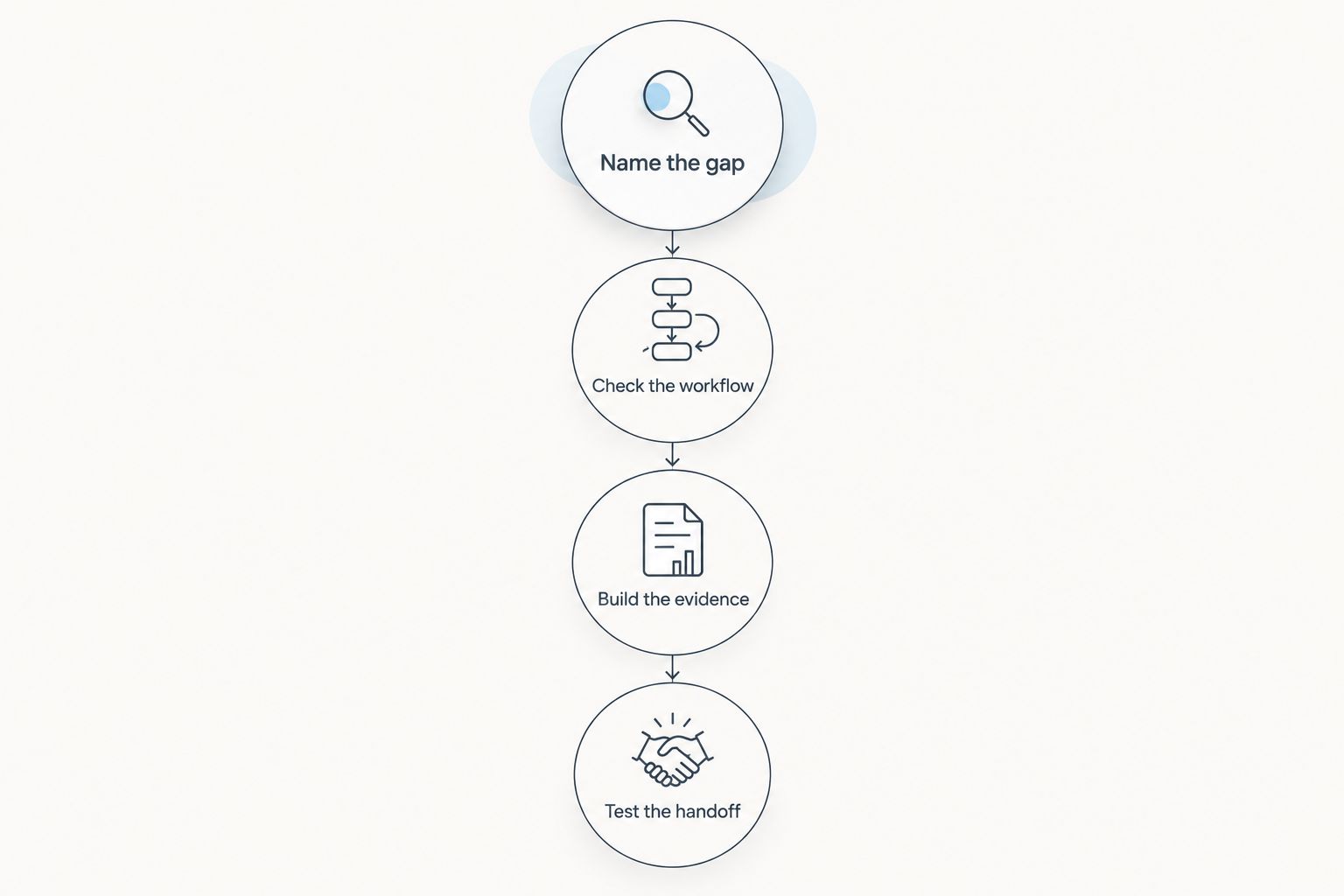
Use this sequence to choose your primary recruiting profile in 2026. Keep 1 primary profile link for your standard outreach so you know which page needs the most attention; that is a workflow recommendation, not a restriction on having other accounts.
Name the gap
Identify the task blocking progress: incomplete information, unclear program fit, disconnected club communication, unanswered process questions, or disorganized video. Choose for that task before comparing optional features.
Check the workflow
Ask your current coach how the platform would fit your recruiting work. Confirm who maintains information and where college-coach replies need attention. Avoid a setup that depends on someone monitoring an account they do not use.
Build the evidence
Prepare your academic information, athletic details, relevant footage, and contact information. Label competition dates and measurement context instead of presenting numbers a coach cannot interpret.
Test the handoff
Run 3 checks before sending the link: can the recipient open it, identify you, and find the next contact step? Review the page from a phone as well as a computer.
A usable page beats a collection of incomplete accounts. After selecting your main profile, update any other recruiting pages you keep so graduation year, contact information, and athletic details remain consistent.
How the ranking works
This ranking prioritizes the criteria above: readable profiles, evaluation evidence, program fit, working relationships, maintenance, and a clear next action. The order reflects distinct recruiting jobs, not a claim that every athlete should use the same platform.
The comparison does not assign placement rates, coach-response rates, or scholarship outcomes. Those figures are not a sound basis for this ranking without comparable evidence about the athletes, sports, and recruiting circumstances involved.
Which recruiting profile builder should you choose?
Choose RecruitMyGame if you need a recruiting profile plus roster and coach-fit insights. Choose SportsRecruits for an existing club workflow, NCSA for recruiting guidance, FieldLevel for team-network connections, and Hudl for video-first presentation.
For an undecided athlete in 2026, start with the work you need to complete next. Do not move platforms simply because another athlete uses a different one; switch when the alternative solves a specific problem your current setup leaves unresolved.
FAQ
What's the best recruiting profile builder for a high school athlete?
The best recruiting profile builder is the one that matches your main recruiting task. Prioritize profile building and program-fit research, club coordination, guidance, coach networks, or video according to what you need next.
What should I put in my recruiting profile?
Include your name, graduation year, sport, position or event, academic information, relevant athletic evidence, and contact details. Give statistics and measurements enough context for a coach to interpret them.
Is a Hudl page enough for college recruiting?
A Hudl page supports video presentation but does not cover the entire college recruiting process. You still need academic information, a suitable college list, and direct communication about a program's recruiting priorities.
Should I use the recruiting platform my club recommends?
Use your club's platform when it supports a recruiting workflow you understand and will participate in. Ask who maintains profiles, reviews college choices, and handles follow-up before relying on that arrangement.
Does a recruiting profile guarantee college coach interest?
No recruiting profile guarantees college coach interest. Coaches still evaluate athletic fit, academic circumstances, and their program's recruiting priorities.
How often should I update my recruiting profile?
Update your recruiting profile whenever relevant information changes. Review contact details, academic information, athletic results, and video before starting a new outreach effort.
Do I need profiles on every recruiting platform?
You do not need a profile on every recruiting platform. Maintain the accounts that serve a clear purpose, and keep important information consistent across the profiles you retain.
One last thing
Test your profile as a stranger before asking a coach to evaluate it. Open the exact link you intend to send in a signed-out browser, check every video, and verify your contact information. That final check catches a practical failure no platform comparison can solve for you.