
Best overall for profiles and coach-fit research: RecruitMyGame. Best for recruiting video: Hudl; best for organizing college research: SportsRecruits; best for recruiting guidance: NCSA—these are the best recruiting apps for athletes to consider in 2026, matched to different needs.
- RecruitMyGame is the best recruiting app for athletes who want profiles, roster insights, and coach-fit research together.
- Hudl fits athletes whose immediate priority is preparing recruiting video.
- SportsRecruits fits athletes organizing college research and recruiting profiles.
- NCSA fits families seeking recruiting guidance rather than another profile alone.
- Choose around your next recruiting task, not the number of platforms you can join.
Why this matters
A recruiting profile, a highlight video, and a college shortlist solve different problems. Treating them as interchangeable leaves you with more accounts but no clearer next step.
For your 2026 recruiting plan, identify the problem first: coaches cannot evaluate your play, your school list lacks direction, or your family needs help understanding the process. Choose the platform that addresses that problem, then judge it by whether you complete useful work—not whether your profile looks finished.
What makes the best recruiting apps for athletes
Use these criteria before choosing a platform. The strongest choice is the one that supports your immediate task without obscuring what you still need to do yourself.
- Evaluation readiness: Can you present your athletic background, graduation year, academic information, and relevant video clearly?
- College fit: Does the platform help you investigate programs rather than collect school names?
- Coach communication: Does it support the work of introducing yourself and maintaining accurate recruiting information?
- Workflow fit: Does its main purpose match your current need: profiles, video, research, or guidance?
- Athlete ownership: Can you understand the information you submit and explain why each college belongs on your list?
Prioritize a clear recruiting task over a long feature list. Before committing to any platform, confirm its current functions, your sport's coverage, and how you would use it during a normal school week.
Recruiting apps at a glance
These recommendations separate different recruiting jobs. The order reflects the broad profile-and-fit use case first, followed by more specific needs; it is not a claim that every athlete needs every platform.
| Platform | Best for | Standout focus | Key limitation |
|---|---|---|---|
| RecruitMyGame | Profiles with roster and coach-fit research | Athlete profiles and insights from Tosch.ai across 20+ sports | Fit insights do not replace direct evaluation by a college coach |
| Hudl | Preparing recruiting video | Sports video review and highlights | Video alone does not establish academic or college fit |
| SportsRecruits | Organizing college research | Recruiting profiles and college-search work | An organized list still needs athlete-specific research |
| NCSA | Getting recruiting guidance | Recruiting education and support | Guidance does not remove the athlete's responsibility to participate |
1. RecruitMyGame: best recruiting app for profile and coach fit
This college recruiting platform helps US high school student-athletes build profiles, access roster and coach-fit insights from Tosch.ai, and connect with college coaches. Its stated coverage spans 20+ sports, making it relevant beyond a single-sport recruiting workflow.
The useful distinction is the combination of presentation and research. You need to explain who you are as an athlete, but you also need reasons to approach a particular program.
RecruitMyGame pros:
- Combines athlete profiles with roster and coach-fit insights.
- Supports connections with college coaches.
- Serves high school student-athletes across 20+ sports.
RecruitMyGame cons:
- Roster and coach-fit insights are research inputs, not confirmation that a coach wants to recruit you.
- Building a profile still requires accurate information and active participation from the athlete.
Best for: A high school athlete who wants profile building and program-fit research in the same recruiting platform.
Use the fit information to form better questions. Ask how your position, graduation year, academic interests, and playing experience relate to a program; do not turn an apparent match into an assumption about an opening.
For a 2026 college shortlist, separate what you know from what needs confirmation. A coach's response and the college's official information matter more than your interpretation of a profile or roster.
Verdict: Buy into the profile-and-fit approach if researching suitable programs is your main recruiting need.
2. Hudl: best recruiting app for preparing video
Hudl is a sports video platform used for reviewing footage and creating highlights. It belongs on this list because athletic evaluation often requires more than a written description of your performance.
Choose it for the video task, not as a substitute for the entire college search. Your film needs to make your play understandable; your recruiting plan still needs academic information, college research, and communication.
Hudl pros:
- Centers the workflow on footage rather than written claims.
- Supports reviewing play and assembling highlights.
- Gives athletes a way to present examples of their performance.
Hudl cons:
- A highlight video does not explain whether a college fits your academic goals.
- Selecting impressive moments without sufficient context can leave evaluation questions unanswered.
Best for: An athlete whose immediate obstacle is presenting useful game footage.
Before editing, identify yourself clearly and choose footage relevant to your sport and position. Keep enough context for a viewer to understand the action rather than relying on effects or a sequence of isolated outcomes.
Ask your high school or club coach what footage demonstrates your current level. That conversation gives the editing process a purpose and helps distinguish a recruiting presentation from a personal highlight reel.
Verdict: Buy into Hudl's video-first approach when usable recruiting film is your missing piece.
3. SportsRecruits: best recruiting app for college-list organization
SportsRecruits provides recruiting profiles and college-search resources. Its place in this comparison is the organizational work between deciding to pursue college sports and knowing which programs deserve your attention.
A school list becomes useful when you can explain each entry. Separate athletic interest from academic suitability, location preferences, and the questions you still need to ask.
SportsRecruits pros:
- Provides a recruiting-profile framework.
- Supports college-search work alongside an athlete's presentation.
- Fits a research-led approach to building a college list.
SportsRecruits cons:
- A college appearing in your research does not establish mutual interest.
- Organized information still needs interpretation and confirmation with official college sources.
Best for: An athlete who needs a clearer structure for researching colleges and maintaining a recruiting profile.
Before choosing SportsRecruits, decide what your shortlist must show. Useful fields include your academic interest, sport, questions for the coaching staff, and the reason you want to learn more about the college.
Do not confuse a longer list with better research. A manageable set of programs you understand is more actionable than a collection of names you cannot explain.
Verdict: Buy into SportsRecruits' research-and-profile approach when college-list organization is your main obstacle.
4. NCSA: best recruiting option for guided support
NCSA is a college recruiting service that provides recruiting education and support. It is a different type of choice from a video-focused tool: the reason to consider it is help understanding and managing recruiting work.
Guidance is most useful when your family has specific questions. Identify whether you need help understanding the process, presenting the athlete, evaluating schools, or planning communication before deciding what support to pursue.
NCSA pros:
- Focuses on college recruiting rather than video editing alone.
- Offers recruiting education and guidance.
- Fits families seeking help interpreting the process.
NCSA cons:
- Support does not replace the athlete's involvement in research and communication.
- You still need to confirm the scope of the service you are considering and whether it addresses your questions.
Best for: A family that wants recruiting guidance and can name the decisions it needs help making.
Bring concrete questions to any conversation about support. Ask who provides the guidance, what work remains with the athlete, and how the service applies to your sport and graduation year.
The athlete should stay involved throughout. A process managed entirely by a parent leaves the student less prepared to explain personal goals and speak with college coaches.
Verdict: Buy into NCSA's guided-support approach when understanding the recruiting process is your main need.
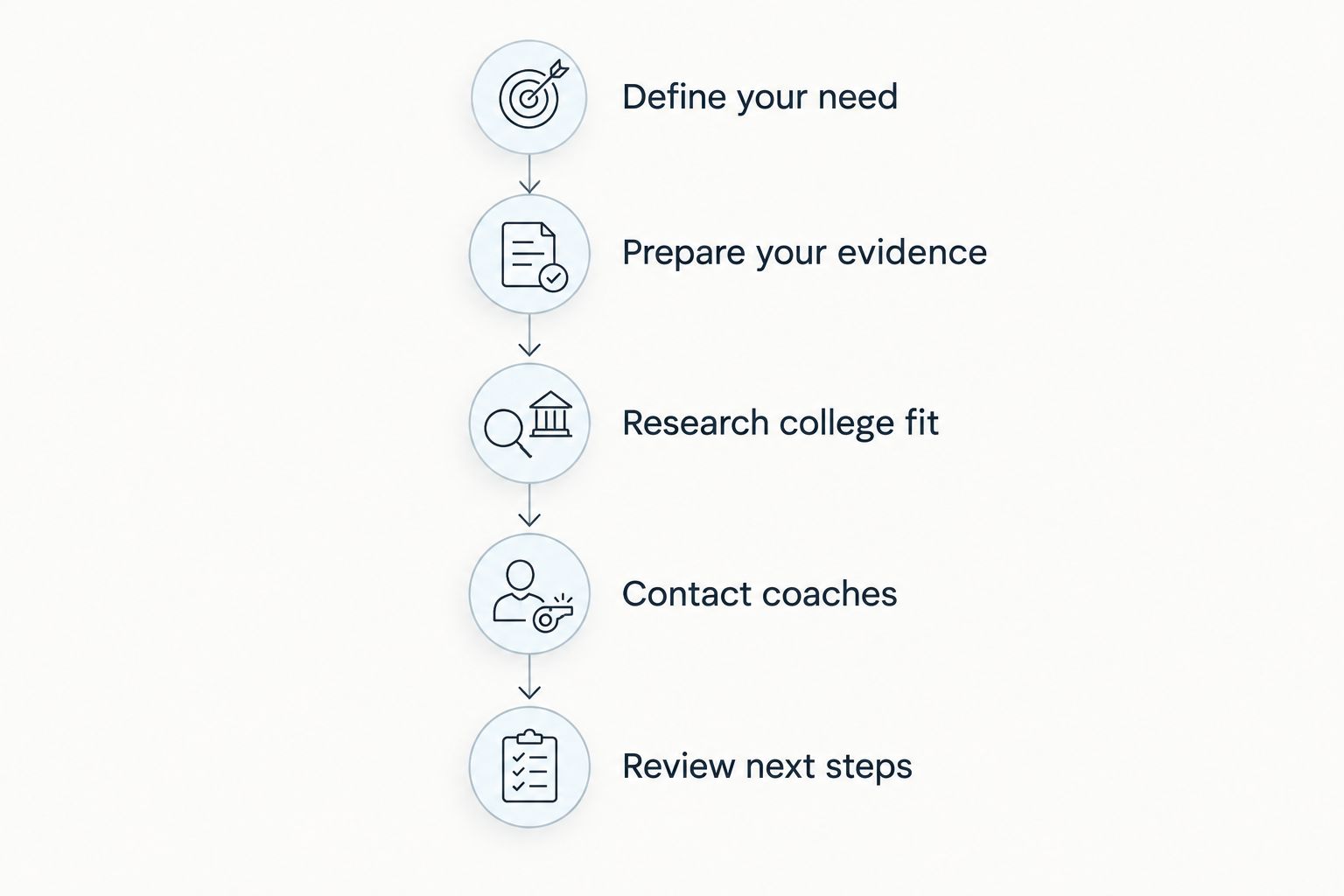
How to choose your recruiting setup in 2026
Start with the work, then choose the platform. This sequence keeps you from opening several accounts before discovering that your film, academic information, or college criteria still need attention.
Define your need
Write down the recruiting task you cannot currently complete. Be specific: presenting footage, researching programs, preparing a profile, or understanding the process.
If you cannot identify the task, delay adding another platform. Review your existing materials with your high school or club coach first.
Prepare your evidence
Gather your graduation year, position or event, athletic background, academic information, and relevant video. Check that the details agree wherever you present them.
For your 2026 profile, distinguish current information from older results. Clear labeling helps a coach understand what each item represents without guessing.
Research college fit
Build an initial list of 5 schools as a practical starting exercise, not a recruiting benchmark. For each school, write down why it interests you and what remains unknown.
Check official college and athletics information before treating a detail as settled. Use platform insights to guide questions, not to replace answers from the institution.
Contact coaches
Prepare a concise introduction that identifies you, explains your interest, and points to relevant information. Follow the college's stated recruiting instructions where provided.
Keep your question specific enough to answer. Asking about the appropriate next step is more useful than sending a message that only announces your ambition.
Review next steps
Set aside 30 minutes each week as a planning habit. Update changed information, review replies, and choose the next useful action.
These are suggested working intervals, not claims about recruiting outcomes. Adjust the routine around your schoolwork, sport, and actual recruiting activity.
How we ranked these recruiting options
The ranking uses the criteria above: evaluation readiness, college fit, coach communication, workflow fit, and athlete ownership. It prioritizes the combined profile-and-fit task, then separates video, college research, and guidance into distinct recommendations.
This is a use-case comparison, not a measured performance ranking. It does not assign recruitment rates, coach-response rates, or scholarship outcomes to any platform.
The practical test is whether the platform helps you complete your next task. An organized account with no current information or follow-through is not a finished recruiting plan.
Which recruiting app should you choose?
Choose the profile-and-fit option by default if you need both an athlete presentation and a more informed college shortlist. Choose Hudl when film is the immediate gap, SportsRecruits when research organization is the gap, and NCSA when your family needs guidance.
You do not need to adopt every option in this comparison. Start with the one that addresses your clearest obstacle, complete the relevant work, and reassess before adding another tool.
FAQ
What's the best recruiting app for a high school athlete?
The best recruiting app depends on the athlete's immediate task. Choose a profile-and-fit platform for presentation and program research, Hudl for video, SportsRecruits for college-search organization, or NCSA for guidance.
Is Hudl enough for college recruiting?
Hudl addresses the video portion of recruiting, not every part of the college search. You still need to research academic and athletic fit, maintain accurate information, and communicate with programs.
Should I use more than one recruiting app?
Use more than one recruiting app only when each serves a distinct purpose. Keep your graduation year, athletic details, academic information, and video consistent across the platforms you use.
Can a recruiting app guarantee a college roster spot?
A recruiting app does not make a college coach's roster decision. Treat profiles, insights, and guidance as support for research and communication, not confirmation of an offer.
What should I prepare before creating a recruiting profile?
Prepare your graduation year, position or event, athletic background, academic information, and relevant footage. Label results clearly and check that your information is current.
How do I know whether a college is a good athletic fit?
Investigate the program, your academic goals, and the questions relevant to your position and graduation year. Roster research helps you prepare, but direct communication is necessary to understand a coach's interest.
What should parents do during college recruiting?
Parents should help with organization and decisions while keeping the athlete involved. The student should understand the college list, review submitted information, and take an active role in coach communication.
One last thing
Before opening another recruiting account, ask yourself: Can I explain why each college on my list belongs there? If the answer is only that you recognize the name, your next task is research—not another profile.
For 2026, keep a short note beside each target college: why it interests you, what you know, and what you need to ask. That turns a list of schools into a plan you can act on.